
What is GitOps? A Plain-English Beginner Guide with Real Examples
Modern infrastructure is getting complex:
- Containers
- Kubernetes
- Microservices
Managing all this manually? Not scalable.
That’s where GitOps comes in.
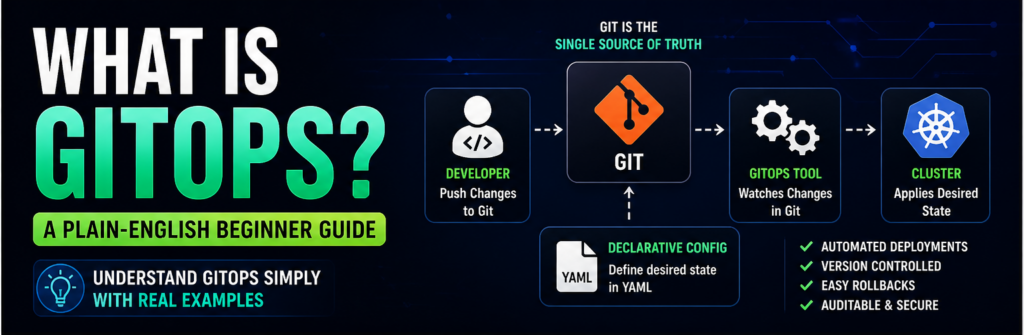
GitOps is a modern approach to managing infrastructure using Git as the single source of truth.
Tools like Argo CD have made GitOps easier than ever.
In this guide, you’ll understand GitOps in simple terms, with real examples you can actually use.
What is GitOps?
GitOps is a way of managing infrastructure and deployments using Git.
Instead of manually changing servers, you:
- Write configuration in Git
- Push changes
- Automation tools apply changes
👉 Git becomes your control panel.
Why GitOps Matters
Without GitOps:
- Manual deployments
- Human errors
- Hard to track changes
With GitOps:
- Version control
- Automated deployments
- Easy rollback
Core Principles of GitOps
1. Git is the Source of Truth
Everything lives in Git.
2. Declarative Configuration
You define desired state.
3. Automated Sync
System matches actual state to Git.
Real Example (Simple)
You want to deploy an app:
Without GitOps:
- SSH into server
- Run commands
With GitOps:
- Update YAML file
- Push to Git
- Deployment happens automatically
GitOps Workflow
- Developer commits code
- Git updates
- GitOps tool detects change
- Deploys automatically
Key Components
Git Repository
Stores configuration.
CI/CD Pipeline
Builds artifacts.
GitOps Tool
Applies changes.
Popular GitOps Tools
- Argo CD
- Flux
GitOps vs Traditional DevOps
| Feature | Traditional | GitOps |
|---|---|---|
| Deployment | Manual | Automated |
| Source of Truth | Mixed | Git |
| Rollback | Hard | Easy |
Benefits of GitOps
- Faster deployments
- Better security
- Easy rollback
- Full audit trail
GitOps in Kubernetes
GitOps is widely used with Kubernetes.
Why?
Because Kubernetes uses YAML → perfect for Git.
Example GitOps YAML
apiVersion: apps/v1
kind: Deployment
metadata:
  name: my-app
Real-World Use Case
Startup deploying microservices:
- Each service defined in Git
- Changes auto-deployed
Common Mistakes
- Mixing manual changes
- Not using version control properly
- Ignoring automation
When to Use GitOps
- Kubernetes environments
- Multi-service apps
- Cloud-native setups
When NOT to Use GitOps
- Very small projects
- Single server setups
Security in GitOps
- Role-based access
- Audit logs
- Git history tracking
FAQs
Is GitOps hard?
No, once basics are clear.
Do I need Kubernetes?
Mostly yes.
Final Thoughts
GitOps is the future of DevOps. It simplifies deployments, improves reliability, and gives you full control over your infrastructure.