
GitOps Tutorial — How to Deploy Apps Using Git as the Source of Truth
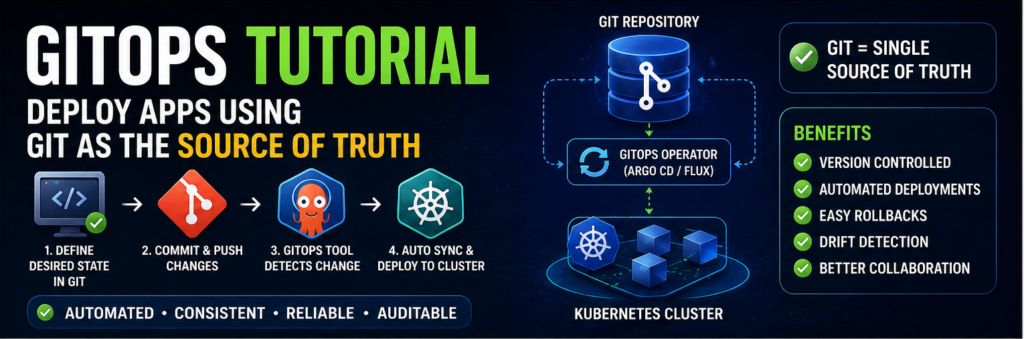
Modern infrastructure has become too complex to manage manually. With microservices, containers, and distributed systems, traditional deployment methods struggle to keep up.
That’s where GitOps comes in.
GitOps is a modern approach to deployment where Git becomes the single source of truth for your infrastructure and applications.
In this GitOps tutorial, you’ll learn:
- What GitOps is
- How it works
- Tools involved
- Step-by-step implementation
- Real-world best practices
What is GitOps?
GitOps is a deployment methodology where:
👉 Git repositories define the desired state of your system
Instead of manually deploying applications, GitOps ensures that:
- Any change in Git automatically updates your infrastructure
- Your cluster always matches what’s defined in Git
Why GitOps Matters
Without GitOps:
- Manual deployments cause inconsistencies
- Hard to track changes
- Rollbacks are messy
With GitOps:
- Everything is version-controlled
- Easy rollbacks
- Automated deployments
Core Principles of GitOps
1. Declarative Configuration
Define system state in code.
2. Version Control
Store everything in Git.
3. Automated Deployment
Changes are automatically applied.
4. Continuous Reconciliation
System always matches Git.
GitOps Architecture
Typical GitOps setup includes:
- Git repository
- CI/CD pipeline
- Kubernetes cluster
- GitOps operator
Popular GitOps Tools
Common tools include:
- Argo CD
- Flux
How GitOps Works (Simple Flow)
- Developer pushes code
- CI builds artifacts
- Git repo updated with config
- GitOps tool detects change
- Deploys to cluster
Step-by-Step GitOps Setup
Step 1: Create Git Repository
Store:
- Kubernetes manifests
- Helm charts
Step 2: Set Up Kubernetes Cluster
You need a running cluster.
Step 3: Install Argo CD
kubectl create namespace argocd
kubectl apply -n argocd -f https://raw.githubusercontent.com/argoproj/argo-cd/stable/manifests/install.yaml
Step 4: Access Argo CD
kubectl port-forward svc/argocd-server -n argocd 8080:443
Step 5: Connect Git Repository
Add your repository in Argo CD.
Step 6: Deploy Application
Argo CD will:
- Sync manifests
- Deploy automatically
Step 7: Enable Auto Sync
Ensure continuous deployment.
Benefits of GitOps
- Faster deployments
- Better reliability
- Easy rollback
- Improved collaboration
GitOps vs CI/CD
GitOps is an extension of CI/CD focused on deployment using Git.
Best Practices
- Keep Git clean
- Use branches properly
- Secure secrets
- Monitor deployments
Common Mistakes
- Mixing app and infra configs
- Not using automation
- Ignoring drift
Real-World Insight
Companies using GitOps:
👉 deploy faster
👉 recover quicker
👉 reduce human errors
FAQs
Is GitOps only for Kubernetes?
Mostly, but concept can apply elsewhere.
Is GitOps hard to learn?
No, once basics are clear.
Final Thoughts
GitOps is one of the most powerful approaches to managing modern infrastructure. If you’re working with Kubernetes or cloud-native systems, learning GitOps is a must.